

Description
“PCB Design with KiCad: From Basic to Advanced” is a professional course on Printed Circuit Board (PCB) design using KiCad, published by the online learning platform Udemy. You will explore the KiCad interface, create and manage schematic diagrams, select electronic components, and connect circuits using schematic capture tools. You will learn how to assign footprints, design PCB layouts, position components, route electrical connections, and organize board layers to produce functional, well-structured circuit boards. The course also covers fundamental concepts such as Design Rule Checking (DRC), component libraries, signal routing, and the preparation of manufacturing files for PCB fabrication. Through practical design workflows, you will gain a deeper understanding of the process of transforming electronic circuit concepts into manufacturable hardware.
Whether you are an electronics beginner, an engineering student, a hobbyist, or a professional looking to enhance your hardware design skills, this course provides a solid foundation for creating reliable PCB designs using KiCad. Throughout the course, you will draw circuit schematics, design single-layer, double-layer, and multi-layer layouts, generate Gerber files, create custom library components, produce Bills of Materials (BOMs), perform Electrical Rule Checks (ERC) and Design Rule Checks (DRC), and delve into advanced topics such as high-speed and high-voltage PCB design. This project-based approach offers a deep, practical understanding of how these concepts are applied in real-world scenarios, preparing you for professional PCB design.
What you will learn in PCB Design with KICAD from Basic to Advanced:
- Drawing circuit schematics.
- PCB Layout: Single & Two-layer design and Multi Layer.
- Creation of Gerber files.
- Library part creation.
- BOM generation.
- and …
Course specifications
Publisher: Udemy
Instructors: Muhammad Zeeshan khan
Language: English
Level: Introductory to Advanced
Number of Lessons: 125
Duration: 16 hours and 19 minutes
Course topics
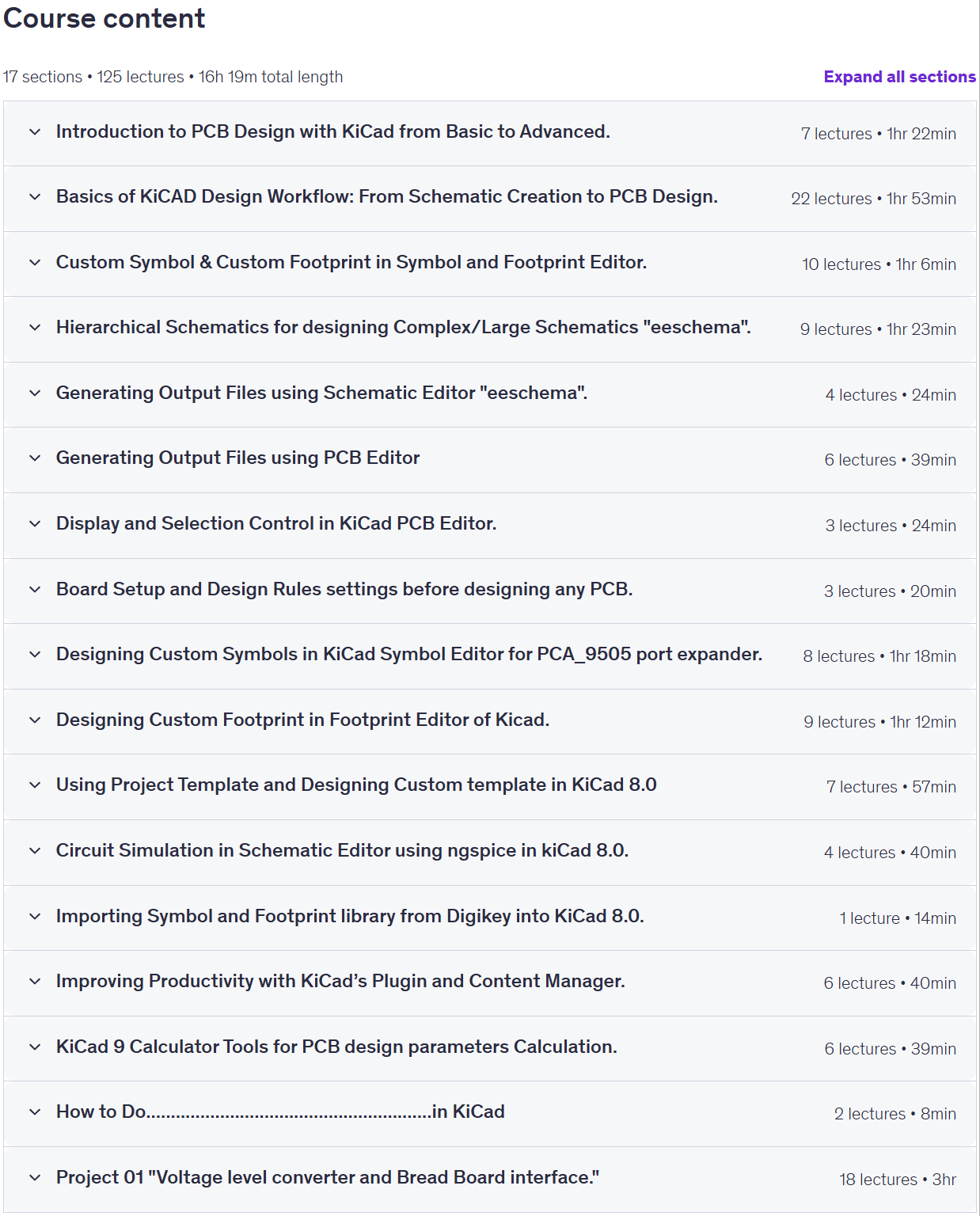
PCB Design with KICAD from Basic to Advanced Prerequisites
No prerequisites, but a basic understanding of the electronics components is a plus point.
Pictures

PCB Design with KICAD from Basic to Advanced introduction video
Installation guide
After Extract, watch with your favorite Player.
English subtitle
Quality: 1080p
Downloadly link
Rapidgator link
File password (s): www.downloadly.ir
Size
8.1 GB