


Description
VPS Essentials – The Practical Guide is a Virtual Private Server (VPS) training course published by Academind Online Academy. This course provides a practical introduction to Virtual Private Servers (VPS) and teaches individuals how to deploy, configure, secure, and manage servers for real-world applications. Designed for beginners and aspiring system administrators, the course covers the fundamentals of Linux server administration, remote access, networking, web hosting, and server security. Individuals will learn how to set up a VPS from scratch, manage users and permissions, configure firewalls, install web servers and databases, automate maintenance tasks, and monitor system performance.
This course provides the practical foundation you need. We start with the basics, explain what a VPS is and when it makes sense, and then move step-by-step toward creating, securing, and using your own server. You’ll get short, practical lessons, copy-and-paste commands, checklists, and health checks so you always know what you’re doing and why. By the end, you’ll be able to build and scale a VPS for real-world use cases: hosting web applications, running one-time or recurring workflows, and running AI agents like Pi or OpenClaw on an isolated, always-on machine.
What you will learn in VPS Essentials – The Practical Guide:
- Codex basics and how to do it right
- Core commands and context engineering
- Different input modes
- “Planning mode” for structured workflows
- Configuration management and permissions
- What, why and how behind each feature
- Agent skills and advanced agent features
- MCPs (Model Context Protocols)
- Codex SDK for custom integrations
- Using Codex as a no-code bot
- Codex in CLI and IDE
- Codex in native desktop app
- Codex in web (cloud)
- Building a complete real-world project with Codex
- And…
Course specifications
Publisher: Academind
Instructors: Maximilian Schwarzmüller
Language: English
Level: beginner to advanced
Number of Lessons: 33
Duration: 2h 22m
Course topics
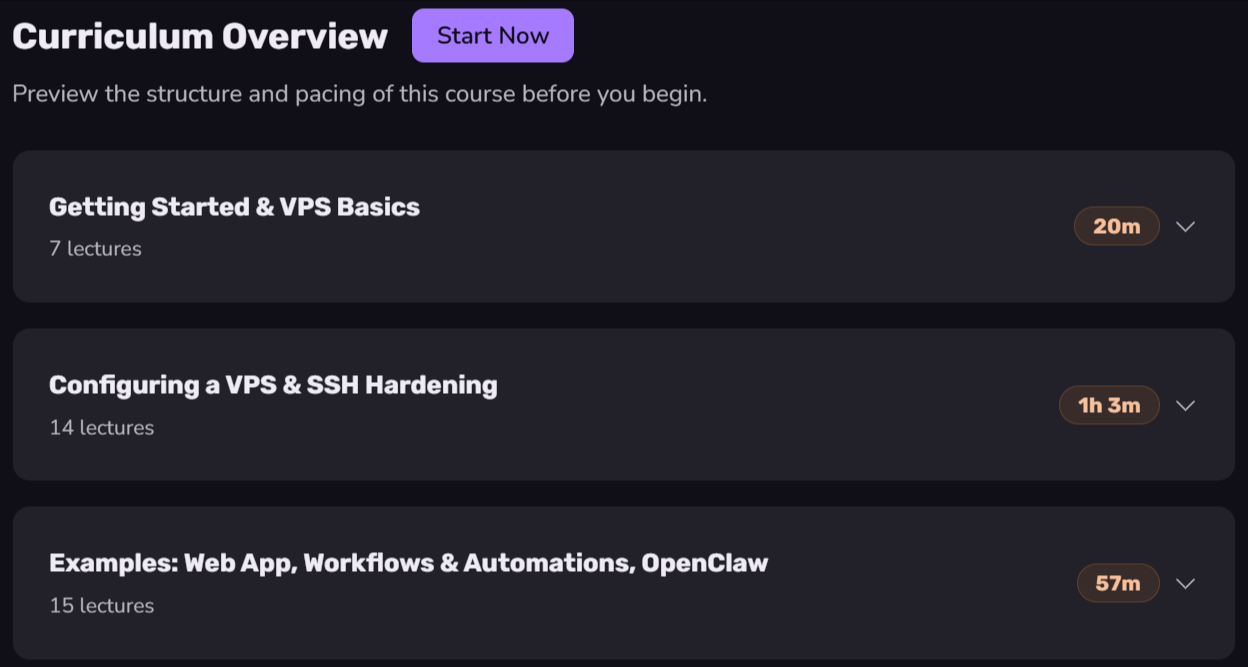
VPS Essentials – The Practical Guide Prerequisites
No prior VPS, Linux admin, or DevOps experience is required.
Basic web development or terminal knowledge is helpful, but not required.
To follow along hands-on, you should be able to rent a small VPS from a provider like Hetzner, DigitalOcean, AWS, or others.
Pictures

VPS Essentials – The Practical Guide introduction video
Installation guide
After Extract, watch with your favorite Player.
Subtitle: None
Quality: 1080p
Downloadly link
Rapidgator link
File password (s): www.downloadly.ir
Size
447 MB