

Description
Master Linux Troubleshooting: Hands-On Training for 2026 Pro. This course teaches system administration, troubleshooting, shell scripting, security, networking, and storage management in Linux environments from beginner to advanced. This comprehensive course is designed for students, system administrators, DevOps engineers, cloud professionals, and newbies to build practical and hands-on Linux skills from the ground up. Instructor Shikhar walks students through the process of learning system administration, troubleshooting, automation, Bash Shell Scripting, networking, security, and enterprise server management. The focus of the course is on hands-on implementation, real-world labs, and IT industry scenarios. The course begins with the history and basic concepts of Unix and Linux, and then walks you through the steps of installing CentOS 9 and CentOS 10 on Oracle VirtualBox and connecting to them using tools like PuTTY and MobaXterm. In addition to basic Linux commands and filesystem structure, advanced topics such as user and group management, password policies, permissions, and ACL access levels are covered. Critical server topics such as OpenSSH, process management, kernel modules, partitioning, RAID, logical volume management (LVM), package management with RPM and YUM, email services, Apache web server, Samba, DNS, and Firewalld and SELinux configuration will be covered, along with troubleshooting the Linux boot process and recovery modes (Emergency & Rescue Modes).
What you will learn
- Understand the history and core concepts of Unix and Linux operating systems.
- Step-by-step installation and configuration of CentOS 9 using Oracle VirtualBox.
- Navigate the Linux file system and execute common commands such as ls, cp, mv, grep, and cat.
- Configure Bash Profile, environment variables, and manage I/O Redirection.
- Create, manage, and secure user accounts and groups based on best practices.
- Enforce password expiration policies with the chage command.
- Set file permissions and ownership along with special permissions (Setuid, Setgid, Sticky Bit, and ACL).
- Automate repetitive tasks with Crontab and task scheduling.
- Use find, awk, and sed for text processing and system administration.
- Manage processes, kernel modules, and monitor system performance.
- Disk partitioning, RAID configuration, and Logical Volume Management (LVM).
- Install and manage software packages with RPM and YUM.
- Upgrade Linux and automate OS installation with Kickstart.
- Network configuration, DNS, FTP, NFS, and web and email servers (Apache, Samba, Postfix).
- Securing Linux systems with firewalls, SELinux, and system hardening techniques.
- Backup and restore data using dump and other tools.
- Write and debug Bash scripts with loops, functions, and conditional logic.
- Implement a practical project to automate pre-approval reports in the real world.
- Understanding the Linux boot process on CentOS 10 and RHEL 10.
- Working with Emergency and Rescue modes to restore the system.
- Troubleshooting and fixing common failures in the Linux boot process.
- Recover missing or damaged GRUB, Kernel, and Initramfs files.
- Fix boot issues caused by incorrect fstab and root filesystem configuration.
- Performing Disaster Recovery with GRUB and Rescue environments.
This course is suitable for people who:
- Beginners who want to learn Linux from scratch with real-world examples.
- IT students and professionals looking to build a strong foundation in Linux.
- System administrators and DevOps engineers who need hands-on experience in Linux.
- Software developers who need to understand Linux environments.
- People preparing for the international RHCSA and RHCE exams.
- Professionals looking to change careers to systems management or DevOps.
Master Linux Troubleshooting: Hands-On Training for 2026 Pro Course Details
- Publisher: Udemy
- Instructor: Shikhar Verma
- Training level: Beginner to advanced
- Training duration: 43 hours and 58 minutes
Course syllabus in 2026/5
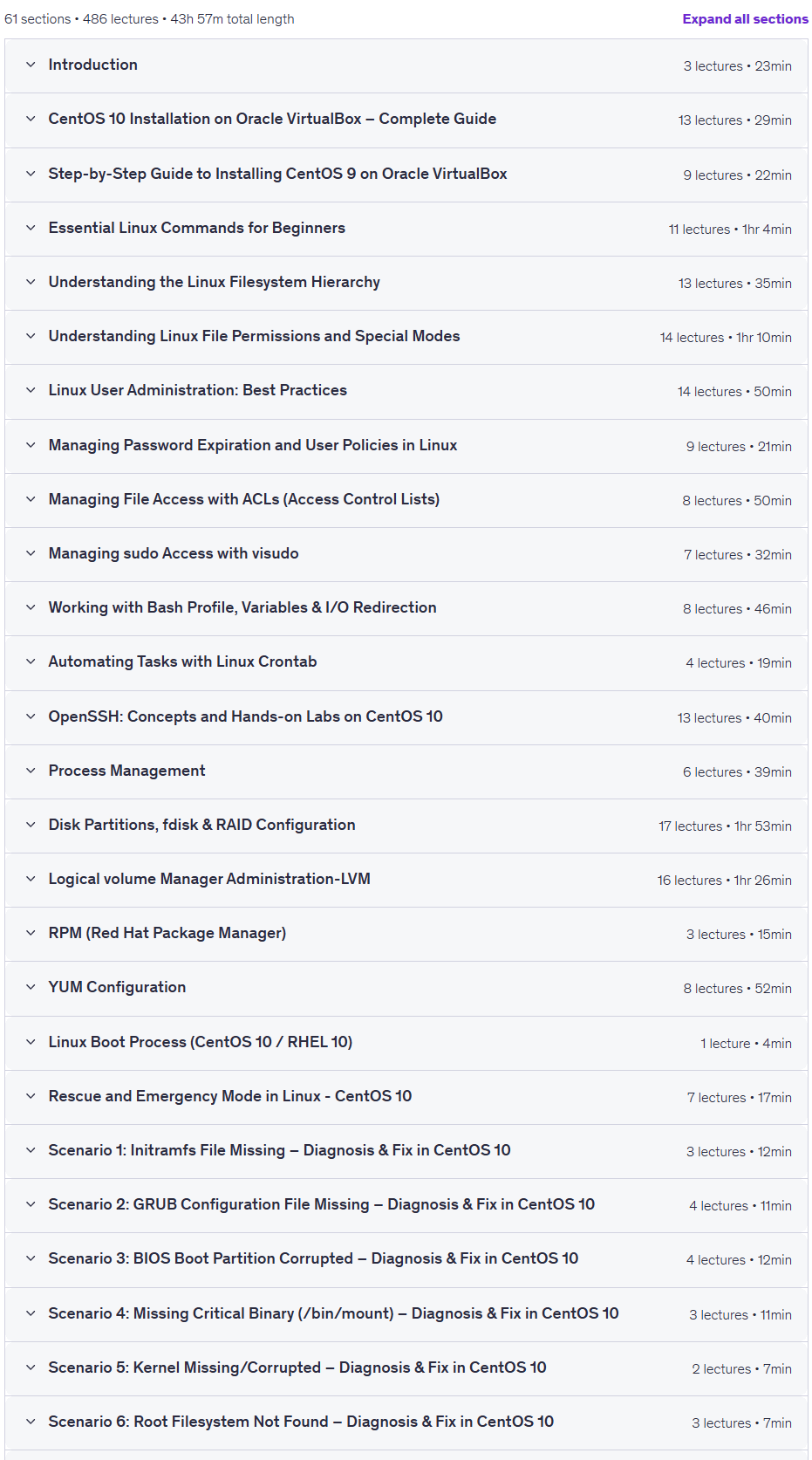
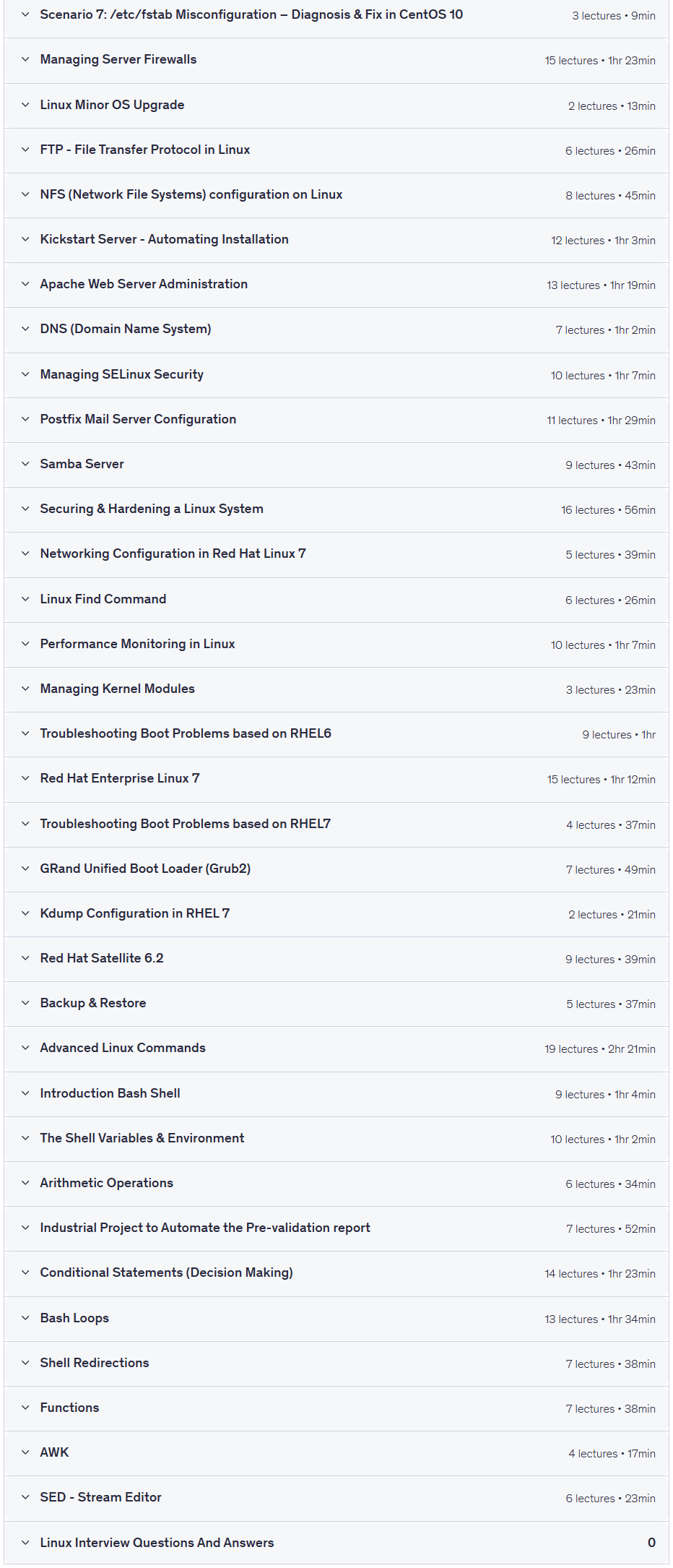
Prerequisites for the Master Linux Troubleshooting: Hands-On Training for 2026 Pro course
- PC or Laptop with internet connection
- No prior Linux experience required – this course is designed for complete beginners.
- Basic understanding of computers (using keyboard, mouse, internet, etc.).
- Access to a computer or laptop with at least 8 GB of RAM (recommended).
- Willingness to install and use free tools like Oracle VirtualBox, CentOS 9/10 ISO, PuTTY, or MobaXterm.
Course images

Sample course video
Installation Guide
After Extract, view with your favorite player.
Subtitles: None
Quality: 1080p
Download link
Rapidgator link
File(s) password: www.downloadly.ir
File size
11.7 GB