


Description
Build AI Apps with Python is a course on building intelligent applications using Python and modern AI technologies published by Udemy Online Academy. Designed for Python developers, aspiring AI engineers, software developers, and tech enthusiasts, this course covers the complete workflow of building AI-based applications, from integrating machine learning and large language models (LLMs) to deploying production-ready solutions. Students will learn Python for AI development, rapid engineering, LLM integration, API usage, retrieval additive manufacturing (RAG), vector databases, AI agents, data processing, application deployment, and best practices for building scalable AI systems.
Rather than focusing on complex AI theory, this course shows you how to connect existing AI models to real software and turn ideas into usable applications. Throughout the course, you will build hands-on Python AI projects. These projects include an AI chat app, a document or text summarization tool, and a knowledge assistant that can help users find and understand information. By the end of the Building AI Apps with Python course, you will understand how to design, build, test, and share practical apps powered by large language models. You will gain hands-on experience with Python, LLM APIs, generative AI development, chatbot development, AI application architecture, and deployment principles.
What you will learn in Build AI Apps with Python:
- Set up a Python development environment for building AI-powered applications.
- Install and manage Python libraries, packages, dependencies, and environment variables.
- Connect Python applications to large language models using APIs.
- Send prompts and structured inputs to AI models and process their responses.
- Manage API requests, authentication, errors, rate limits, and basic security practices.
- Parse AI-generated responses into text, lists, JSON, and other useful formats.
- Understand the basic roles of the frontend, backend, and application logic.
- Create simple interfaces that allow users to interact with AI features.
- Manage conversation history, user inputs, application state, and generated outputs.
- Design a clean and understandable architecture for a small AI application.
- Build practical projects such as chat applications, summarization tools, and knowledge assistants.
- Add validation, error handling, logging, and fallback behavior to AI applications.
- Test and debug common issues involving APIs, prompts, dependencies, and user interfaces.
- Package an AI application so it can be shared or deployed.
- Understand basic hosting, maintenance, monitoring, and application-update considerations.
- Apply responsible practices for handling API keys, private data, and AI-generated content.
- and …
Course specifications
Publisher: Udemy
Instructors: School of AI and Arjun Vaid
Language: English
Level: Introductory to Advanced
Number of Lessons: 15
Duration: 1h 26m
Course topics
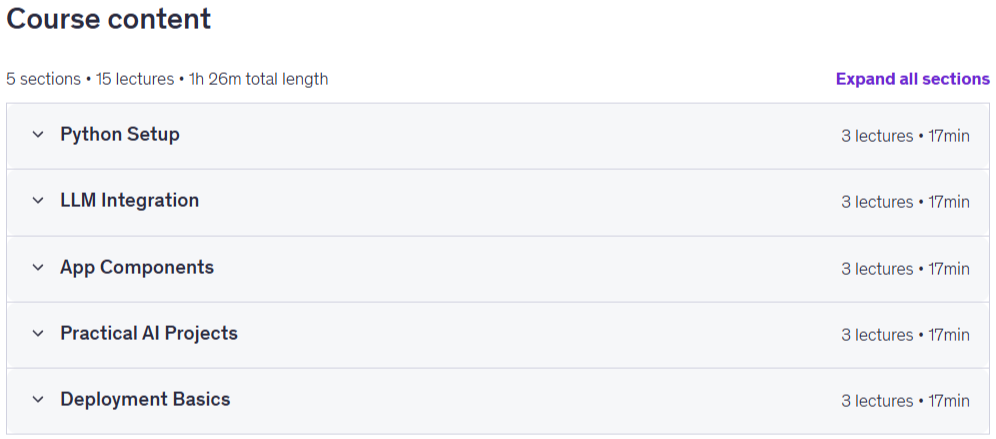
Build AI Apps with Python Prerequisites
Basic familiarity with computers, files, folders, and web browsers is recommended.
No previous artificial intelligence or machine learning experience is required.
Beginner-level Python knowledge is helpful, but the course includes guidance on the Python concepts used.
A computer capable of running Python and a code editor is recommended.
An internet connection may be required for installing libraries and accessing model APIs.
Access to an AI model API or a supported local model may be useful for practical exercises.
Students should be comfortable following step-by-step coding demonstrations.
No advanced mathematics, data science, or deep learning knowledge is needed.
Familiarity with APIs, JSON, or web development can be helpful but is not required.
A willingness to experiment, troubleshoot errors, and improve projects through testing is encouraged.
Pictures

Build AI Apps with Python introduction video
Installation guide
After Extract, watch with your favorite Player.
Subtitle: None
Quality: 2160p
Downloadly link
Rapidgator link
File password (s): www.downloadly.ir
Size
1.4 GB