


Description
Deploy Django on Ubuntu: Nginx, PostgreSQL, Celery & SSL. This comprehensive course helps developers confidently move their Django projects from localhost to production. It takes you through the steps needed to set up a production environment that is secure, scalable, and ready to host real users. Using industry-standard tools, the instructor walks you through how to configure an Ubuntu server step-by-step. Unlike a basic tutorial, this course covers all the layers of a professional application. These layers include setting up a powerful PostgreSQL database for data management, using Nginx as a reverse proxy for optimal request management, and using Gunicorn to run your application as a systemd service. One of the highlights of this course is the focus on background processing using Celery and RabbitMQ, which is crucial for building real-world applications. The course also fully implements the process of connecting a dedicated domain and obtaining an SSL certificate for secure HTTPS communication. It is noteworthy that no prior knowledge of server administration is required to participate in this course, and all steps from provisioning an AWS EC2 server to executing Linux commands are clearly explained.
What you will learn
- Professional Deployment: Learn how to move a Django project to an Ubuntu server using Nginx and Gunicorn.
- Database management: Setting up and configuring the PostgreSQL database, setting environment variables, and connecting the project to the operational database.
- Asynchronous Processing: Install and configure Celery, Celery Beat, and RabbitMQ to manage scheduled tasks and background jobs.
- Security and Networking: Connecting a personal domain to the server and installing SSL certificates via Let’s Encrypt for secure HTTPS access.
- Static file management: Setting up and preparing static files to display images and styles correctly in the server environment.
- Working with cloud infrastructure: Learn how to create and manage a virtual machine in the AWS cloud service.
This course is suitable for people who:
- Django developers: People who want to go beyond their personal system and run their applications on live servers.
- Novice developers: Those who have built their first project and want to make it available to everyone on the web for free.
- Freelancers: Programmers who work on client projects and need to deliver a professional and secure deployment process to the client.
- Resume Builders: People who want to increase the value of their resume to employers by adding Deployment and Server Administration skills.
- DevOps enthusiasts: Those looking to learn the complete process of setting up a web application infrastructure from scratch.
Course details Deploy Django on Ubuntu: Nginx PostgreSQL Celery & SSL
- Publisher: Udemy
- Instructor: Ayodeji Adesola
- Training level: Beginner to advanced
- Training duration: 2 hours and 39 minutes
- Number of lessons: 17
Course topics
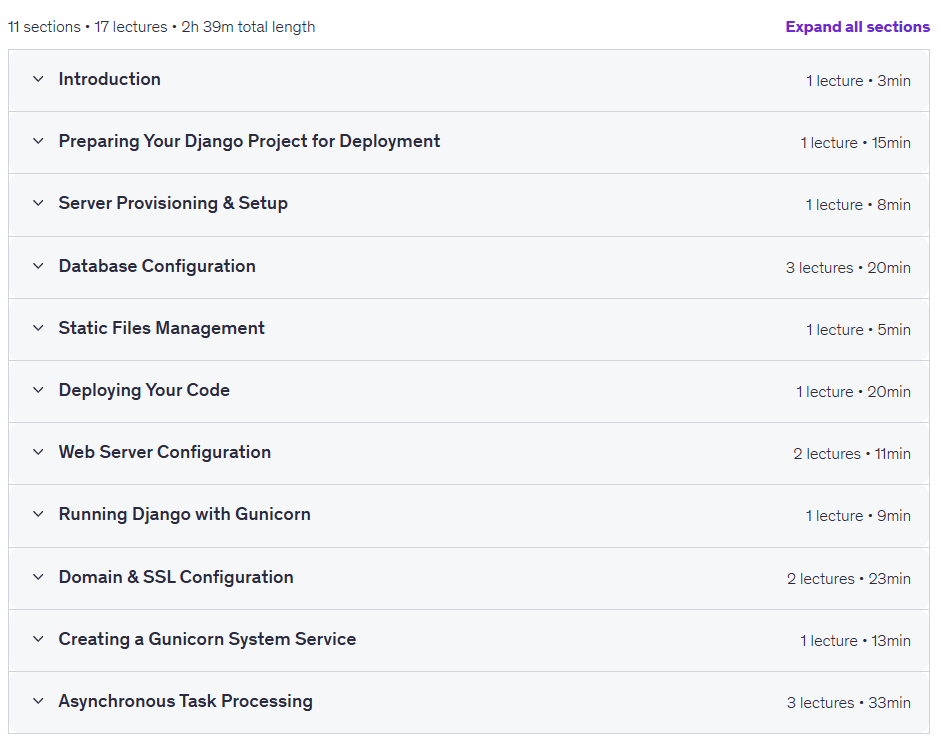
Prerequisites for the Deploy Django on Ubuntu course: Nginx PostgreSQL Celery & SSL
- Basic understanding of Django framework and how to build Django applications
- Familiarity with command line/terminal operations and basic Linux commands
- A GitHub account for version control and code deployment
- Basic understanding of Git and GitHub
- An existing Django project ready to be deployed (or you can use a sample project)
- Access to a server or willingness to provision a FREE one (I’ll show you how to set up a Free AWS EC2 instance)
Course images

Sample course video
Installation Guide
After Extract, view with your favorite player.
Subtitles: None
Quality: 1080p
Download link
Rapidgator link
File(s) password: www.downloadly.ir
File size
1.5 GB