
Descriptions
Microcontroller Interfacing with Different Elements, Everything you wanted to know about interfacing different electronic components with microcontrollers, explained step by step. This course is a comprehensive guide to connecting and controlling LEDs, switches, buttons, 7-segment displays, LCDs, piezoelectric speakers, sounders, relays, transistors, and Darlington transistors using different types of microcontrollers. It includes more than 40 lectures and over 3 hours of HD video content, along with supplementary materials, more than 3 quizzes, 15 articles, 10 downloadable resources, example code, and a certificate of completion. You will learn how each component works, understand the principles behind its interfacing method, and practice simulating circuits and making real-world connections. The course also provides step-by-step explanations of connection diagrams and coding stages, helping you develop the skills to interface electronic components with Arduino, PIC microcontrollers, Raspberry Pi, and other microcontroller platforms. You will learn to interface and control different components, write code that enables a microcontroller to recognize and interact with them, understand the concepts behind each interfacing method, simulate circuits, and apply your knowledge in practical electronics projects.
The course covers LEDs, switches and buttons, 7-segment displays, LCDs, piezoelectric speakers, sounders, relays, transistors, and Darlington transistors. It is suitable for different microcontroller platforms, including Arduino, PIC microcontrollers, Raspberry Pi, and other types. The course is presented by the Educational Engineering Team, a group of engineers with more than 13 years of experience in teaching and practical projects. The team focuses on explaining complex subjects through detailed, step-by-step lessons and practical examples that learners can apply to their own projects. The instructor, Ashraf Said AlMadhoun, is an educator, mechatronics engineer, electronics and programming hobbyist, and maker. He has worked in microcontroller and programming education since 2007, founded the Educational Engineering Team, creates courses for the EduEng YouTube channel, and has authored four books about microcontrollers. His teaching and project experience includes Arduino, PIC microcontrollers, Raspberry Pi, and programming. The team also develops educational content in circuit design, simulation and PCB fabrication, programming in C and Python, PLC industrial programming and automation, 3D design and simulation, and ESP and IoT technologies.
What you’ll learn
- Interface different electronic components with microcontrollers.
- Write code that enables a microcontroller to recognize and interact with different electronic components.
- Control different electronic components.
- Embed code into the design.
- Interface LEDs with your microcontroller.
- Interface switches with your microcontroller.
- Interface buttons with your microcontroller.
- Interface 7-segment displays with your microcontroller.
- Interface LCDs with your microcontroller.
- Interface piezoelectric speakers with your microcontroller.
- Interface sounders with your microcontroller.
- Interface relays with your microcontroller.
- Interface transistors with your microcontroller.
- Interface Darlington transistors with your microcontroller.
Who this course is for
- Microcontroller enthusiasts.
- Arduino enthusiasts.
- Raspberry Pi enthusiasts.
- PIC microcontroller enthusiasts.
- Engineering students.
- Anyone interested in interfacing different electronic components with microcontrollers.
- Anyone interested in controlling different electronic components with microcontrollers.
- PIC microcontroller enthusiasts.
- Technology hobbyists.
- Computer programmers.
Specificatoin of Microcontroller Interfacing with Different Elements
- Publisher : Udemy
- Teacher : Educational Engineering Team , Ashraf Said AlMadhoun , Educational Engineering
- Language : English
- Level : All Levels
- Duration : 4 hours and 26 minutes
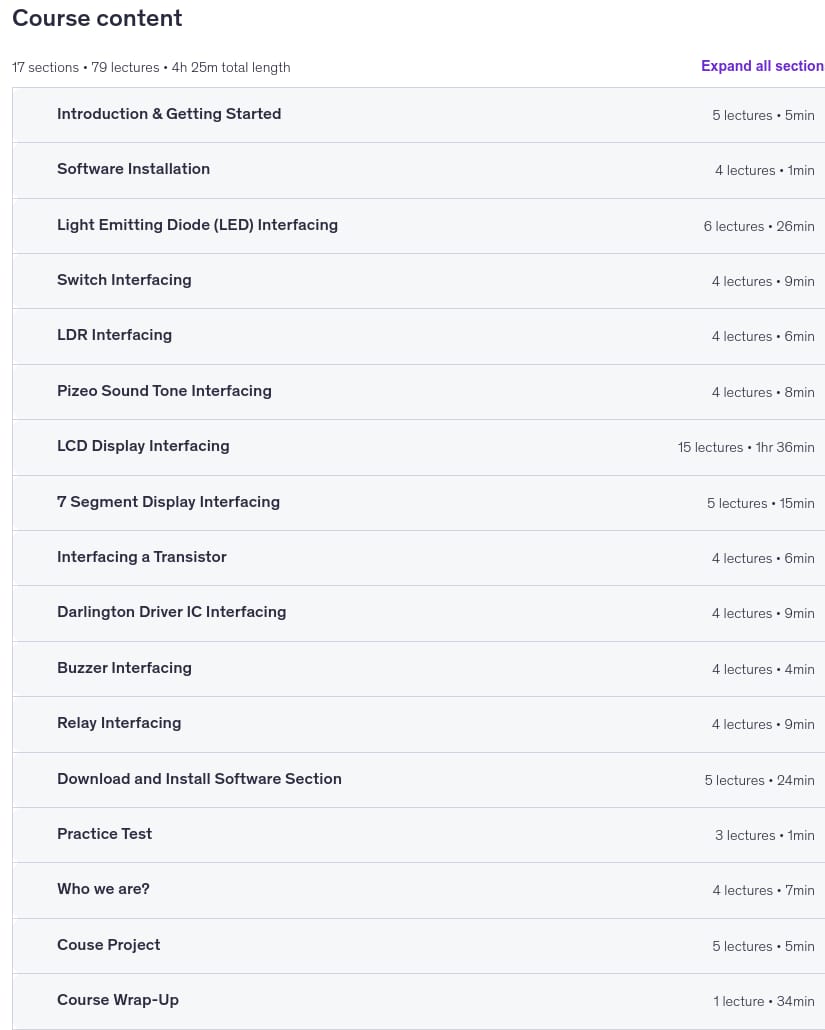
Content of Microcontroller Interfacing with Different Elements
Requirements
- A computer to run the software
- A basic knowledge in Programming in any language
- Download and Install Proteus Professional (FREE & Explained inside the Course)
- Download and Install MikroC Pro (FREE & Explained inside the Course)
- Download The course Material in PDF and Print them if possible
- Students must have the knowledge of basic electronics
Pictures
Sample Clip
Installation Guide
Extract the files and watch with your favorite player
Subtitle : Not Available
Quality: 720p
Download Links
Downloadly
Rapidgator
Password file(s): www.downloadly.ir
File size
2.86 GB
2 Comments. Leave new
If possible, place in rapidgator also. Thank you.
Hi
Added