


Description
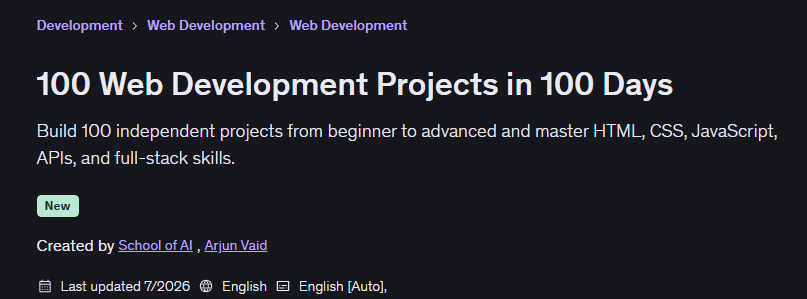
100 Web Development Projects in 100 Days. This comprehensive course guides coding enthusiasts to turn their passion into a professional, job-ready portfolio by building 100 practical projects in 100 days. Rather than wasting time on long theoretical topics, this hands-on course encourages students to showcase their skills from the ground up by building real websites, interactive apps, dashboards, productivity tools, API-based projects, and full-stack platforms. The learning path begins with simple, beginner-friendly projects like personal profile pages, portfolio websites, digital business cards, resumes, product landing pages, restaurant websites, photography galleries, and event registration pages. As the course progresses, learners use JavaScript to build interactive applications such as calculators, timers, random generators, to-do lists, note-taking apps, habit trackers, quizzes, Pomodoro timers, expense trackers, password generators, image carousels, and form validation systems.
Intermediate projects involve the integration of APIs, data management, search, filtering, dashboards, and advanced front-end development, covering things like weather dashboards, GitHub profile finders, movie and book search apps, stock and cryptocurrency trackers, shopping carts, calendar planners, and interactive chart dashboards. In more advanced stages, larger applications are built, such as management dashboards, inventory management systems, invoice generators, link shorteners, survey builders, chatbots, and library management systems. Also, in the final stages, advanced web development with real-time chats, team collaboration tools, blog content management systems, social media platforms, learning management systems, real estate marketplaces, e-commerce stores, and multiplayer browser games are implemented. This course helps people, without the need for prior experience, move step-by-step and at their own pace, write clean code, fix common errors, and ultimately build a powerful portfolio for job and freelance opportunities.
What you will learn
-
Building 100 practical web development projects in 100 days
-
Designing responsive websites using HTML, CSS, and JavaScript
-
Building interactive tools such as calculators, timers, quizzes, and various generators
-
Manage events, forms, arrays, objects, and dynamic content with JavaScript
-
Save and retrieve browser data using local storage
-
Connect applications to third-party APIs and display real-time information
-
Developing weather, movie, book, recipe, stock, and news applications
-
Building e-commerce features including catalogs, shopping carts, wishlists, and filters
-
Create advanced dashboards and management system interfaces
-
Development of full-stack applications, real-time chat platforms, and content systems
-
Improve your troubleshooting, problem-solving, and application development skills
-
Building a Powerful Web Development Portfolio for Recruitment and Freelance Work
This course is suitable for people who:
-
Complete beginners who want to learn web development through practical projects
-
Students who prefer practical learning over purely theoretical lessons
-
Aspiring front-end and full-stack developers
-
Self-taught programmers looking for a structured roadmap to learning
-
Career changers preparing for entry-level roles in web development
-
Freelancers who want to build websites and apps for their clients
-
Programmers who want to improve their HTML, CSS, and JavaScript skills
-
Job seekers preparing for internships or junior programmer positions
-
Entrepreneurs who want to build and test their web app ideas
-
Designers interested in turning user interfaces into functional websites
Course Details 100 Web Development Projects in 100 Days
- Publisher: Udemy
- Instructor: School of AI
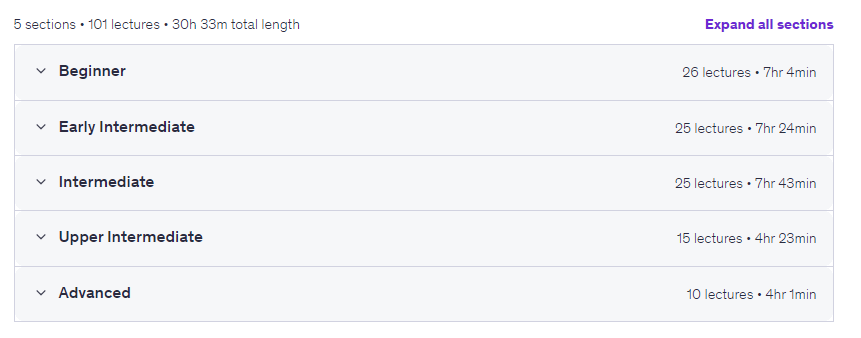
- Training level: Beginner to advanced
- Training duration: 30 hours and 33 minutes
- Number of lessons: 101
Course Topics 100 Web Development Projects in 100 Days
Prerequisites for the 100 Web Development Projects in 100 Days course
- No previous web development experience is required.
- No professional programming background is necessary.
- Basic computer and internet navigation skills are sufficient.
- A Windows, macOS, or Linux computer is recommended.
- A modern web browser such as Chrome, Firefox, or Edge is required.
- A free code editor such as Visual Studio Code is recommended.
- An internet connection is helpful for downloading tools and using APIs.
- Students should be willing to practice and build projects consistently.
- Basic HTML, CSS, or JavaScript knowledge is helpful but not required.
- All projects are introduced gradually, making the course beginner-friendly.
Course images
Sample course video
Installation Guide
After Extract, view with your favorite player.
Subtitles: None
Quality: 2160p
Download link
Rapidgator link
File(s) password: www.downloadly.ir
File size
31.5 GB