


Description
C Programming On Windows For Beginners course is a great opportunity to master the C programming language. Dan, the instructor of this course, with over ten years of experience in C language development, will pass on valuable knowledge and experience to you. The main focus of this course is to teach C programming in the Windows environment. What sets this course apart from other courses is that students will work practically with the compiler. Unlike courses that rely only on integrated development environments (IDEs), in this course you will use the GCC compiler manually, which will give you valuable experience to become a professional programmer.
This course covers all aspects of the C programming language. It starts with the basics and progresses to more advanced concepts such as functions, pointers, and library development. Despite the comprehensive nature of the material, the course is designed to be completely accessible and understandable for beginners. By the end of the course, students will have developed a “book” program that allows the user to create, save, and retrieve books. Upon completion of this course, students will have gained sufficient experience in the C programming language to be able to easily develop their own personal projects. This course will be very useful for students who need a little extra motivation and guidance. This course is suitable for all beginners, regardless of their current skill level. The music in the intro video is provided by Ben Sound.
What you will learn
- How to master the C programming language
- How to manually use the C compiler “gcc”
- How to automate project building using “Makefiles”
This course is suitable for people who:
- C programmers who want to master the language.
Course details: C Programming On Windows For Beginners
- Publisher: Udemy
- Instructor: Daniel McCarthy
- Training level: Beginner to advanced
- Training duration: 5 hours and 11 minutes
- Number of lessons: 46
Course headings
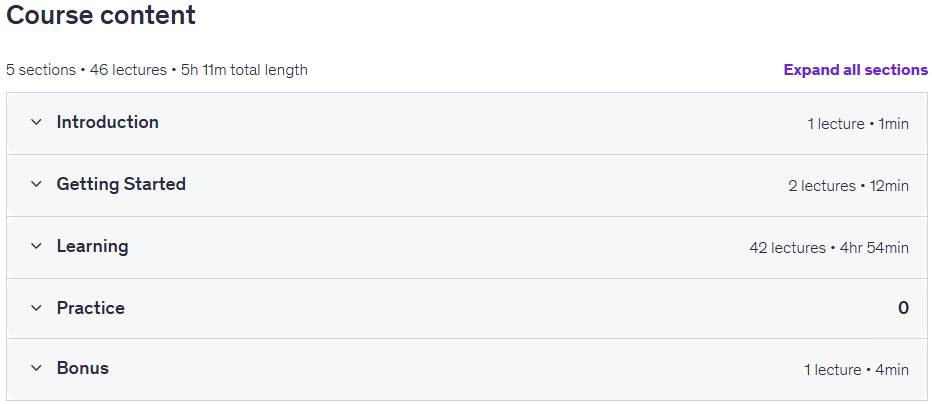
Prerequisites for the C Programming On Windows For Beginners course
- Be able to follow the course all the way through, every lecture pushes you a little further
Course images

Sample course video
Installation Guide
After Extract, view with your favorite player.
Subtitles: None
Quality: 1080p
Changes:
The 2025/6 version has increased by 1 lesson and a duration of 4 minutes compared to 2023/1. Also, the quality of the course has increased from 720p to 1080p.
Download link
File(s) password: www.downloadly.ir
File size
1.89 GB
2 Comments. Leave new
Hello dear team, please update this course to the latest update of 6/2025
Hi
No access