

Description
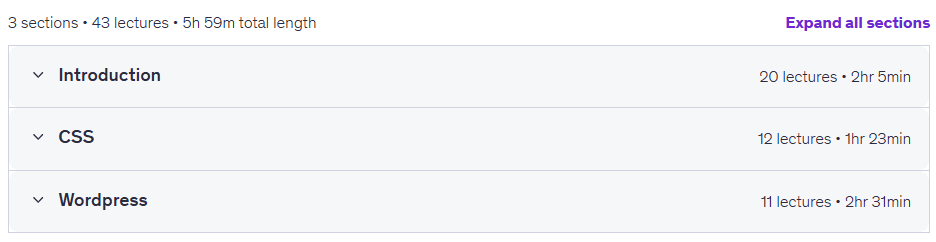
Web Design Course for Beginners to Intermediate. This course is a comprehensive beginner to intermediate level program that helps learners learn the basics of website design from scratch by learning HTML and CSS languages along with the WordPress content management system in a practical way. This course is specially designed for enthusiasts who want to start learning HTML, CSS, and the WordPress system from the most basic topics. If the audience has never had any experience opening or working with HTML, CSS, and WordPress codes and lacks any prior knowledge, this course provides a suitable platform to learn the concepts from the very beginner level to the advanced stages. The structure of this course is divided into three separate sections including HTML, CSS, and WordPress to ensure that learning proceeds in a structured manner. In the first part, HTML, learners will be introduced to topics such as tags, elements, attributes, choosing the right editor, setting up Visual Studio, page structure and title, texts and headings, font and background color, text formatting, links and hypertexts, adding and resizing images, lists, tables and internal frames. In the second part, CSS topics including selectors, external styling, margins (Margin and Padding), colors, texts and boxes are covered. The third part is entirely dedicated to WordPress, which includes things such as installing WordPress, exploring various features, managing media, pages, comments, site appearance, plugins, users, settings and finally developing a complete website. By the end of this course, participants will have acquired strong skills in building websites and will have a complete knowledge of HTML, CSS and WordPress. The course instructor will also answer the learners’ questions at all stages of learning.
What you will learn
- Understanding HTML tags, elements, and features in web design
- Choosing the right editor and how to launch and configure Visual Studio software
- Structuring web pages, determining titles, texts, headlines, and text formatting
- Setting text color, background color, and managing text backgrounds
- Create links, hypertexts, add images and resize them on the page
- Working with lists, tables, and I-frames in web pages
- Using CSS selectors, external CSS codes, internal and external margins (Padding and Margin)
- Adjust colors, backgrounds, texts, and frames using CSS styling
- Installing and setting up WordPress, getting to know its functions, managing media, pages, comments, and website appearance.
- Manage plugins, users, settings, and develop and build a complete website with WordPress.
This course is suitable for people who:
- Beginners who want to start learning HTML from scratch and in a fundamental way.
- Enthusiasts who have no prior knowledge or experience in web design
- People who want to learn website design with HTML, CSS, and WordPress in a structured way
- Those who want to increase their practical skills in building complete websites from scratch
Web Design Course for Beginners to Intermediate Course Details
- Publisher: Udemy
- Instructor: Stephen Koel Soren
- Training level: Beginner to advanced
- Training duration: 6 hours
Course syllabus in 2026/7
Web Design Course for Beginners to Intermediate Prerequisites
- Understand English Language
- Able to run computer
Course images
Sample course video
Installation Guide
After Extract, view with your favorite player.
Subtitles: None
Quality: 1080p
Download link
Rapidgator link
File(s) password: www.downloadly.ir
File size
2.7 GB