

Descriptions
Docker for Software Development: Your First Docker App, Packaging, deploying, and running code consistently can be challenging without a clear strategy. In this course, Docker for Software Development: Your First Docker App, you’ll learn to build and run applications in a containerized environment. First, you’ll set up your local development environment by installing Docker Desktop, running a starter app, and using the VS Code Docker extension. Next, you’ll build images by writing Dockerfiles, running the docker build command, and tagging and pushing images to a registry. Along the way, you’ll learn practical debugging techniques using logs and interactive shells.
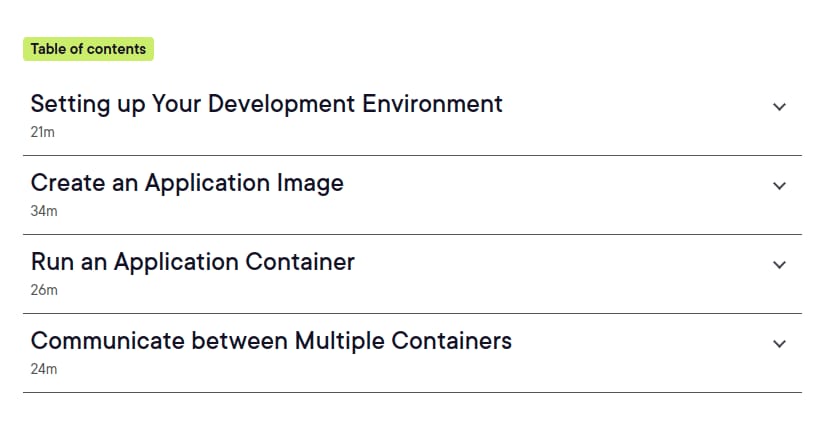
Finally, you’ll run containers with docker run, view logs, manage volumes for persistent data, create container networks, and orchestrate multiple containers with Docker Compose. The course covers setting up a development environment, examining an application, creating custom application images, deploying images to a registry, working with Docker commands and container volumes, establishing bridge networks, communicating between containers, and building and running multiple containers with Docker Compose. When you finish, you’ll have the Docker fundamentals needed to confidently containerize and run your first application across multiple environments.
What you’ll learn
- Set up a local development environment by installing Docker Desktop and running a starter application.
- Use the Docker extension for Visual Studio Code to work with Docker during development.
- Understand Dockerfiles and create a custom application Dockerfile.
- Build Docker images using the docker build command.
- Tag Docker images and push them to a container registry.
- Debug containerized applications using logs and interactive shells.
- Run application containers with the docker run command.
- View container logs and manage volumes for persistent data storage.
- Create bridge networks and connect multiple containers so they can communicate.
- Build and run multiple containers and manage them with Docker Compose.
Who this course is for
- Software developers who want to learn how to use Docker containers in their development projects.
- Developers who need to build, package, and run applications consistently across different environments.
- Beginners who want to learn Docker fundamentals, including images, containers, volumes, and networks.
- Developers interested in using Docker Compose to build and manage applications composed of multiple containers.
Specificatoin of Docker for Software Development: Your First Docker App
- Publisher : Plurlasight
- Teacher : Dan Wahlin
- Language : English
- Level : All Levels
- Duration : 1 hours and 46 minutes
Content of Docker for Software Development: Your First Docker App
Pictures
Sample Clip
Installation Guide
Extract the files and watch with your favorite player
Subtitle : English
Quality: 720p
Download Links
Password file(s): www.downloadly.ir
File size
211 MB