

Description
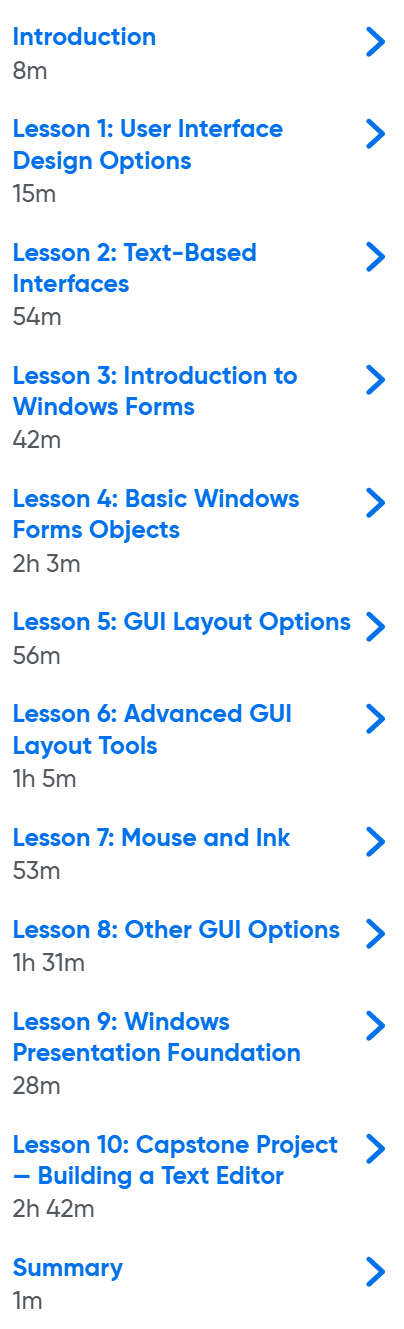
PowerShell UI Design: Designing Interactive PowerShell Tools and Mastering GUI Development. This course explores how to build interactive and functional graphical user interfaces (GUIs) for PowerShell scripts and tools. This comprehensive course, titled “UI Design in PowerShell: Designing Interactive PowerShell Tools and Mastering GUI Development,” teaches students how to take their PowerShell scripts and tools to the next level by creating graphical user interfaces. Throughout the course, students will learn the fundamentals and advanced principles of designing and building GUIs for scripts. The process begins with an overview of design options and then progresses to building a variety of GUI interfaces. The course includes a project and hands-on exercises that provide real-world experience in building interactive menus, progress bars, and other visual elements to dramatically improve the user experience of the tools. As the course progresses, more advanced topics related to GUI layout are covered, including absolute and dynamic layouts, grouping controls, and using tabs and subtabs. Other GUI options such as TreeView, ListView, SplitContainer, and StatusStrip are also thoroughly explored. In addition, students are introduced to Windows Presentation Foundation (WPF) and XAML, which allow them to build more modern and sophisticated graphical interfaces for PowerShell tools. By the end of this course, students will have the skills and knowledge to design and build functional and interactive interfaces that make scripts more accessible to a wider range of users. This course helps IT professionals, system administrators, and developers unleash the full potential of PowerShell and build more efficient tools.
What you will learn
- User interface selection: Choosing and deciding between the different user interface options offered in PowerShell.
- Creating Graphic Objects: Creating various GUI objects such as Buttons, Text Boxes, and Menus.
- Dynamic Design: Building user interfaces that dynamically scale.
- Application Development: Development of full GUI applications.
- Advanced layouts: Using absolute and dynamic layouts, grouping controls, and creating tabs and subtabs.
- Advanced GUI elements: Working with tools such as TreeView, ListView, SplitContainer, and StatusStrip.
- Working with WPF and XAML: Familiarity with and use of WPF and XAML to build modern and advanced graphical interfaces.
This course is suitable for people who:
- IT professionals and system administrators: People who want to go beyond basic scripting and build polished, interactive tools with PowerShell.
- Advanced users: Those who want to automate real-world management tasks and develop efficient tools.
- Developers: People looking to bridge the gap between command-line automation and professional software design.
- Problem solvers and productivity enthusiasts: Anyone looking to simplify daily operations and build easy-to-use interfaces for their scripts.
PowerShell UI Design course specifications: Designing Interactive PowerShell Tools and Mastering GUI Development
- Publisher: Oreilly
- Instructor: Brien Posey
- Training level: Beginner
- Training duration: 11 hours and 43 minutes
Course topics
PowerShell UI Design Course Images: Designing Interactive PowerShell Tools and Mastering GUI Development

Sample course video
Installation Guide
After Extract, view with your favorite player.
Subtitles: English
Quality: 720p
Download link
Rapidgator link
File(s) password: www.downloadly.ir
File size
6.5 GB