


Description
[NEW] Git Made Easy: A Crash Course for Beginners. This course is a quick and practical guide for beginners to learn how to use the Git version control system for code management. This course is designed for people who are unfamiliar with or have doubts about concepts such as commits, branches, and merges, and the main goal is to clear up common confusions in the process of learning Git. You don’t have to be a developer or have a long experience in IT to participate in this course; this training is suitable for newbies to the field of technology, people changing jobs, and even those who are tired of copying commands without understanding their logic. The material is presented in a concise, practical, and direct application-oriented manner, and the language of the training is simple and accompanied by clear graphics so that all participants can easily follow the topics. By the end of this course, you will not only be familiar with essential Git commands, but you will also understand when and why each command should be used so that you can manage your code with complete confidence.
What you will learn
- Understand what Git is and why it is used.
- Quick Git installation and setup.
- Creating and cloning repositories.
- Track work using Commits, Branches, and History.
- Push and pull code from GitHub.
- Resolve Merge Conflicts and work in real collaboration scenarios.
- Understand what Git really does under the hood – without getting bogged down in complex details.
- Collaborate using GitHub through Pull Requests and Forks.
- Manage common workflows such as merging and resolving conflicts.
- Efficiency in using Git by utilizing essential commands and best practices.
- Tips beyond the basics for working with remotes, stashing changes, reviewing code, and using Pull Requests.
- Bonus content such as familiarity with Markdown to improve one’s documentation.
This course is suitable for people who:
- New developers and IT beginners looking to build a strong foundation in version control.
- Aspiring DevOps or Cloud engineers who need Git for automation and collaboration.
- Students or career changers preparing for tech roles or coding projects.
- Anyone who contributes to code projects and wants to use Git with confidence.
Course details
- Publisher: Udemy
- Instructor: Bryan Krausen • 250,000+ Enrollments Worldwide
- Training level: Beginner to advanced
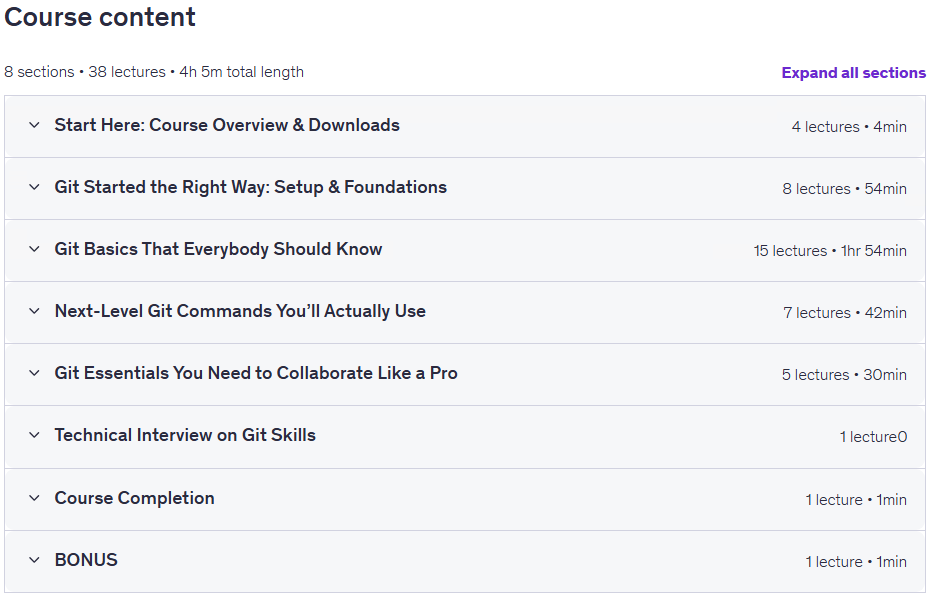
- Training duration: 4 hours and 5 minutes
- Number of lessons: 38
Course syllabus
Course Prerequisites [NEW] Git Made Easy: A Crash Course for Beginners
- Curiosity and a willingness to learn — that’s the most important tool you’ll need!
- Basic computer skills — if you know how to open a terminal or install an app, you’re good to go.
- No prior Git or GitHub experience needed — this course is designed for complete beginners.
- A computer with internet access — Windows, macOS, or Linux are all supported.
Course images
Sample course video
Installation Guide
After Extract, view with your favorite player.
Subtitles: English
Quality: 1080p
Changes:
The 2026/5 version has increased by 5 lessons and a duration of 1 hour and 3 minutes compared to 2025/5. English subtitles were also added to the course. Also, the quality of the course has increased from 720p to 1080p.
Download link
File(s) password: www.downloadly.ir
File size
2.71 GB